Gecko Out
- 4.4
- Rating
- 5.00M
- Installs
- Free
- Price

 Analysis by App-foxy
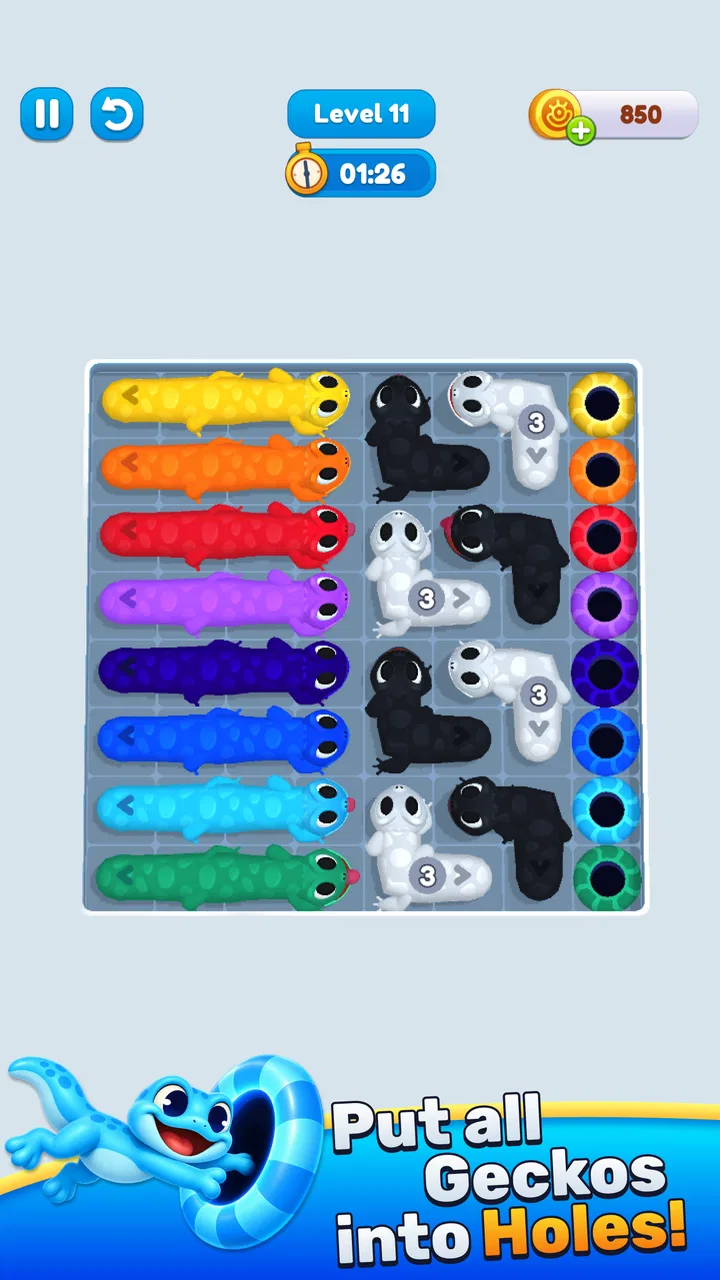
Some puzzle games ask for patience, while Gecko Out asks for quick decisions. I found its central appeal in the pressure created by a messy board and a limited amount of time: you are not simply looking for a solution, you are trying to spot it before the situation gets away from you. That makes it a good fit for short sessions when I want something active rather than a slow, meditative brain teaser.
It is a free puzzle game from Rollic Games, aimed at Everyone, and it has already passed one million installs. Its average rating sits at 4.4 from roughly sixty-six thousand ratings, which gives a useful indication that the basic idea connects with a broad audience. I would still treat those figures as a starting point rather than a guarantee, because the real question is whether you enjoy fast visual problem-solving and can tolerate the pressure that comes with it.
How the fast puzzle format feels in everyday play
The first thing I noticed is that the game’s speed is part of the puzzle, not merely decoration. The store summary describes a race against time to untangle chaos, and that accurately sets the expectation: you need to scan the situation, decide what matters first, and act before overthinking becomes its own obstacle. I enjoy that rhythm more than traditional match-style puzzles when I have only a few minutes available.
You May Also Like

 Blood Strike: 2.5 Anniversary
Blood Strike’s Loadouts Turn Every Drop Into a Tactical Gamble
A close look at Blood Strike’s custom loadouts: how fast access to signature weapons reshapes its battle royale rhythm, rewards preparation, and narrows the gap between fights.

 Pandora - Music & Podcasts
Pandora’s Music Is Easy to Start, but Harder to Recover
Pandora’s strength is its low-effort path from a seed to a station. Its weak spot is how much confidence it asks you to place in connection, setup, and quiet recovery.

 8 Ball Pool
 Is Built on Rivalries, Rematches, and Routine
A close look at the rivalries, rematches, shared routines, and unanswered safety questions that turn a quick pool match into a persistent mobile community.

 Samsung Music
’s Quiet Strength Is Playing What You Already Own
Its reach comes less from spectacle than from dependable access to a personal library. That simplicity is both the app’s strongest retention engine and its ceiling.

 AccuWeather: Weather Radar
AccuWeather Review: A Quick, Clear Forecast for Everyday Decisions
For everyday plans, the best forecast is the one you can understand quickly. AccuWeather makes rain timing, radar, and local conditions easy to act on, with a few trade-offs.

 Hill Climb Racing
Why Hill Climb Racing Still Turns Crashes Into One More Run
A tiny car, a bumpy hill and one more upgrade: Hill Climb Racing keeps resurfacing because its simple chaos makes every near-miss feel personal.
More From Our News Desk



A realistic use case is a short break between errands or while waiting for an appointment. I can open it, concentrate on a compact challenge, and stop without needing to remember a long story or manage a complicated character build. That makes it easier to fit into an uneven day than a game that expects a long uninterrupted session. The trade-off is that a rushed puzzle can feel less relaxing than a game built around gentle repetition.
The key skill is not moving quickly for its own sake; it is choosing the right first move. When the board looks tangled, I try to identify the obstruction that affects the most other pieces instead of immediately tapping the first available option. This small habit reduces wasted actions and makes the time limit feel more manageable. It is also the kind of practical improvement that is easy to miss if you approach every level as a frantic tapping exercise.
The game’s current version is 12.0.0, so it is not presented as an untouched early release. That matters for expectations: I approached it as an established mobile puzzle experience rather than a rough prototype. Still, a version number by itself does not tell me how every device will behave, so I would judge the actual feel on your phone after a few sessions, especially if you tend to keep many apps open.
What happens when the board becomes demanding
The most demanding moments are not necessarily the longest ones. A compact puzzle can require more concentration than a larger, slower level if several possible actions look equally plausible. In those moments, the pressure comes from switching between observation and execution. I sometimes lose more time by repeatedly reconsidering a safe move than by committing to it and adapting afterward.
That creates an interesting performance expectation. A game like this should feel responsive enough that the player can trust a quick decision, but the experience is also sensitive to interruptions. A notification, a brief loss of focus, or an accidental touch can matter more here than in a turn-based puzzle. I would not choose it when I want to play while constantly dividing my attention between the game and another task.
For heavier use, I recommend playing in short blocks rather than treating it as an endless background activity. The format rewards a clear head, and repeated attempts after frustration can make the same puzzle appear harder than it really is. Taking a short pause is not just good for concentration; it helps separate a genuine planning problem from a rushed mistake.
Another useful approach is to study the opening state before making the first move. I look for pieces or paths that appear to control access to several others, then work outward from there. This is more reliable than reacting to each change one at a time. It also gives the game a little more depth than its quick-play presentation initially suggests, because success depends on recognizing structure under pressure.
Stability, recovery, and the cost of interruption
From a player’s point of view, reliability has two sides. The first is whether the game remains comfortable during ordinary play; the second is whether it is forgiving when real life interrupts. Fast puzzles are naturally less tolerant of interruptions than slower alternatives. If I have to answer a message or put the phone down suddenly, the loss is not only a few seconds of play but potentially the whole attempt’s momentum.
That is why I see this as a better choice for deliberate mini-sessions than for playing while commuting, cooking, or watching television. The game may be easy to start, but the mental state it asks for is more focused than the simple interface suggests. When I give it my full attention, the pressure feels fair. When I play half-distracted, mistakes feel self-inflicted rather than caused by an unclear puzzle.
Recovery after a failed attempt is another important part of the experience. The best way to recover is to identify the decision that caused the board to become difficult, not simply repeat the same sequence faster. I usually replay with one change to the opening plan. That turns failure into a small experiment and prevents the time limit from making the game feel like pure trial and error.
I also recommend avoiding repeated rapid taps when you are unsure. In a game built around untangling, an impulsive action can create more confusion than it solves. A brief visual check before committing is often more valuable than trying to compensate with speed later. This is a practical distinction between responsive play and frantic play, and it makes a noticeable difference to how stable the experience feels emotionally.
Because the game is free to download, it is easy to test without making an immediate purchase decision. There are in-app purchases ranging from $1.99 to $99.99 per item, so I would keep that in mind if you are reviewing optional spending or handing the device to a younger player. The Everyone rating makes it broadly accessible, but an age rating does not replace sensible purchase controls on a shared phone or tablet.
Device requirements and practical expectations
The listed minimum operating system is Android 7.0, which gives the game a wide potential device range. That is helpful if you are using an older Android phone rather than a recent flagship. At the same time, compatibility is not identical to a consistently smooth experience: an older device may meet the operating-system requirement while still feeling less comfortable during extended play, particularly if storage, memory, or battery condition is already poor.
I would approach the first session as a quick practical test. Check whether touches register as expected, whether transitions remain comfortable after several puzzles, and whether the phone becomes noticeably warm during your normal play period. Those observations are more useful than assuming that a supported operating system guarantees identical performance everywhere. For a quick puzzle game, input confidence matters more to me than visual spectacle.
Resource demands are also connected to how you use the app. A short session on a modern device is a different situation from leaving any game open for a long stretch while switching repeatedly between apps. If your phone is already close to its limits, close unnecessary background apps before playing and avoid judging the experience after a single moment of multitasking. I prefer to evaluate it under the conditions in which I will actually use it.
Players on older hardware should also consider the screen itself. Fast untangling depends on seeing relationships between elements clearly and tapping accurately. A small display, worn touch panel, or heavy screen protector can make a puzzle feel more difficult even when the underlying challenge is reasonable. That is not a reason to reject the game automatically, but it is a real trade-off for anyone using an aging handset.
For tablets, the larger screen could make visual scanning easier, especially when the arrangement becomes busy. However, a bigger display does not remove the time pressure. I would choose a device that lets me see the whole situation without repeatedly shifting my grip. The best setup is the one that supports quick recognition, not necessarily the one with the largest screen.
Where it stands beside familiar puzzle alternatives
Compared with a traditional crossword, sudoku, or non-timed logic puzzle, this game is more immediate and less contemplative. Those alternatives let me pause, calculate, and return later without feeling that the board has moved on. Gecko Out is better when I want urgency and a clear burst of concentration. It is not the better choice for a quiet evening when I want to solve at my own pace.
Compared with match-three games, it appears to put more emphasis on reading the whole arrangement before acting rather than relying mainly on repeated pattern recognition. That difference makes it feel more mentally active to me, although players who enjoy relaxed chain reactions may find the time pressure tiring. If your favorite puzzle habit is making casual moves while listening to a podcast, a slower alternative will probably suit you better.
It also differs from story-driven puzzle adventures because the immediate satisfaction comes from clearing a tangled situation, not from exploring a narrative world. I would recommend it to someone who wants a focused mechanical challenge and does not need dialogue, collection systems, or a large progression layer to stay interested. If atmosphere and story are the main reason you play, this is unlikely to replace those games.
The strongest comparison is therefore about tempo. This is a quick-response puzzle for people who enjoy making a plan and adjusting it under a clock. It is less suitable for players who dislike pressure, need long uninterrupted thinking time, or want every session to feel calm. That distinction is more useful than simply calling it “casual,” because casual availability does not always mean casual mental effort.
Who will get the most from the game
I think it works particularly well for players who enjoy short challenges with a visible objective. You do not need to commit to a long campaign to feel that you have accomplished something, and the format makes it easy to fit a few attempts into a spare moment. It can also appeal to people who like testing their visual planning rather than relying on trivia, word knowledge, or elaborate controls.
It is a reasonable option for families because the content rating is Everyone, but I would still be careful with the purchase side on a shared device. The free entry point makes trying it simple, while the available in-app purchase range means adults should use the usual safeguards if children can access the game. The rating describes suitability of content, not spending behavior.
I would skip it if you are looking for a completely offline-feeling, no-pressure puzzle routine, a deep narrative, or a game that can sit in the background while you multitask. I would also hesitate to recommend it to someone who becomes frustrated by repeating a challenge after a rushed mistake. In that case, a turn-based logic game or a slower puzzle may provide the same mental exercise with less tension.
Players who are sensitive to performance should start with a short session rather than assuming the game will behave exactly like a demanding three-dimensional title or exactly like a lightweight calculator. The right question is whether your device keeps touch input dependable and the screen comfortable during the way you play. That practical test matters more than the install count or the version number.
Small habits that make the experience better
My first tip is to reserve the opening seconds for reading instead of tapping. Look for the move that frees the most space or reduces the number of blocked possibilities. This approach is especially useful when the board initially looks chaotic, because it converts a visual mess into a sequence of priorities.
My second tip is to use failed attempts as information. If a move creates a dead end, remember what it blocked and change only that part of the plan next time. Rebuilding the entire strategy after every mistake wastes the very knowledge you just gained. This makes progress feel more deliberate and reduces the temptation to play faster simply because the clock is running.
Third, separate speed from haste. A quick player notices the important relationship early; a hasty player touches whatever is available first. When I focus on recognition, I often finish with less frantic movement and fewer corrective actions. That is the most valuable lesson I took from the game’s format, and it applies directly to deciding whether a puzzle is challenging in a satisfying way or merely stressful.
Finally, choose your playing environment carefully. A quiet break, a stable grip, and a clear view of the screen make the time-based design feel much fairer. Playing during constant interruptions makes it harder to tell whether I dislike the game or simply chose the wrong moment. That distinction is worth making before deciding that the format is not for you.
My performance verdict
After looking at speed, demanding moments, recovery, and device constraints together, I see Gecko Out as a focused puzzle game rather than a passive time filler. Its strongest quality is the way it turns visual organization into a quick decision-making exercise. The experience is most convincing when I give it a few uninterrupted minutes and treat each attempt as a small planning problem.
The limitations are equally clear. Time pressure can make interruptions costly, repeated failures can become irritating, and older or less comfortable devices may expose the importance of accurate touch input. The free price is inviting, but the in-app purchase range deserves attention on shared devices. None of these points ruins the game, yet they explain why it will suit some puzzle players much better than others.
Rollic Games has positioned it in an accessible part of the puzzle category, with an Everyone rating, support beginning at Android 7.0, and a current version of 12.0.0. Those details make it easy for many Android users to try. I would not install it expecting a long story or a relaxed brainteaser; I would install it expecting compact challenges that reward seeing the right move before the clock forces the issue.
My recommendation is simple: try it if you like fast visual puzzles and want something that can fill a short, focused break. Skip it in favor of a slower logic game if you need unlimited thinking time or regularly play while distracted. For the right player, its best performance is measured less by spectacle than by how confidently it turns a tangled board into one clear next move.
FAQs for Gecko Out
01What is Gecko Out and what does it do?
Gecko Out is a versatile productivity app designed to streamline your scheduling and task management. It offers features like calendar integration, reminders, and collaborative tools to enhance productivity. Whether you’re managing personal tasks or coordinating team projects, Gecko Out is crafted to help users stay organized and efficient.
02Is Gecko Out available for both Android and iOS platforms?
Yes, Gecko Out is available for download on both Android and iOS devices. The app is optimized for each platform, ensuring a seamless user experience whether you are using a smartphone or tablet. You can find it on the Google Play Store and the Apple App Store.
03Does Gecko Out offer any in-app purchases or subscriptions?
Gecko Out offers a free version with essential features. For users interested in more advanced functionalities, such as enhanced collaboration tools and custom integrations, there is a premium subscription. This subscription can be purchased on a monthly or annual basis, with a free trial available for new users.
04Can Gecko Out be used offline, and will it sync data once online?
Yes, Gecko Out can be used offline, allowing users to access their schedules and manage tasks without an internet connection. Once you are back online, the app automatically syncs any changes made offline, ensuring your data is always up-to-date across all devices.
05How does Gecko Out handle user data and privacy?
Gecko Out prioritizes user privacy by using end-to-end encryption for all data transmissions. The app complies with major data protection regulations, ensuring that your personal information remains secure. Users have full control over their data and can manage privacy settings within the app.
Pros
- User-friendly interface with intuitive navigation.
- Offers real-time updates and alerts.
- Customizable settings for personalized use.
- Highly responsive customer support.
- Compatible with both Android and iOS.
Cons
- Requires constant internet connection.
- Limited free version features.
- Occasional in-app ad interruptions.
- Higher battery consumption during use.
- Some features require premium subscription.

Gecko Out
Gallery